
Overview
InterestThing calculates interest using the settings in the Compute options sheet.
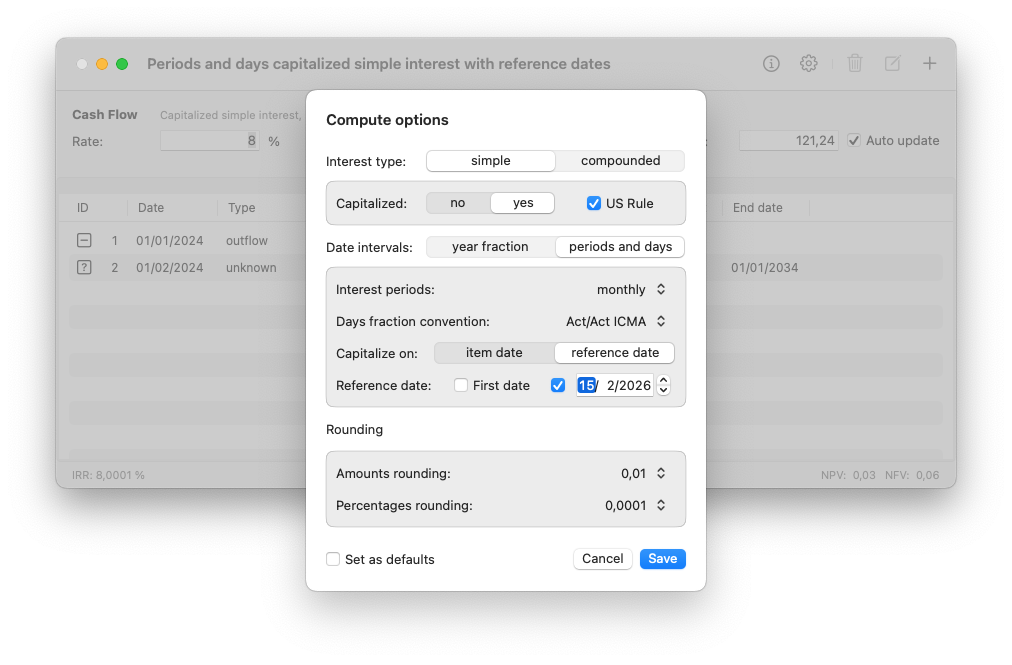
To open the Compute options sheet, click the Gear icon in the toolbar or select Edit Compute Options from the Edit menu.
Few settings, many configurations
The Compute options sheet lets you quickly define how interest should be calculated, by combining one of four interest types with — depending on the interest type — one of three date interval methods, each supported by up to 20 day count conventions for calculating day fractions.
For a detailed description of the available interest types, see Interest types.
For a description of the available date interval methods and day count conventions, see Date intervals.
For a list of the available day count conventions, see Day count convention reference.
To let new documents automatically open with the current settings, check the Set as defaults checkbox.
Related topics
Interest calculation fundamentals
Date interval methods
Day count convention taxonomy
Reference days and capitalization